#howto
18 posts · Last used 9d
Replying to
@ellenmorrisprewitt@writing.exchange I've tried and like several European ✉️ providers, among them
@protonprivacy@mastodon.social 🇨🇭 https://protonmail.com
@mailfence@noc.social 🇧🇪 🇪🇺 https://mailfence.com
@Tutanota@mastodon.social 🇩🇪 🇪🇺 https://tutamail.com
These three all have free tiers so you can test them and see which one you'd pay for.
#howTo
@freeopensource @howto @tutorial
#ADBtutorial #scrcpyTutorial
.. or #howTo get your cellphone onto your computer.
A thread about the tool adb to access your android cellphone and become able to do all the stuff of your hand held computer from your desktop. You don't have to root your phone to be able to use #ADB, but you do have to switch developers mode on. You can do that in settings, depending on your android version, somewhere in a settings subfolder by tapping like ten times on the serial number (or something like that) of your phone. Next you have to open the "developer options" section that has appeared at the bottom of the settings section and enable "debugging with USB".
ADB is also available on windows, perhaps MacOS, yet the info here is from the view point of a #linux #debian #desktop. Except a few details, things shouldn't be different for users of proprietary operating systems.
How to install ADB and connect your phone to your computer | click to open/close
To install ADB:
apt get install adb
Connect your phone with a USB cable to your desktop computer.
Open the console of your computer and type or copy/paste:
adb devices
ADB will list you the TCP port it opens for the USB connection and the device (or devices) connected that it recognizes.
The output will be something like this:
:~$ adb devices
List of devices attached
4xxxxxxxxxxxxd device
Another necessary program for your desktop computer is scrcpy. This program allows you to project the screen of your cell phone onto your desktop screen if you have ADB installed.
To install #scrcpy:
apt get install scrcpy
Important note about the scrcpy versions and compatibilityThis program is, from the coding point of view, in full development mode. To prevent to run into compatibility trouble with your installed ADB version, in particular when using ADB over WIFI, you should pull the scrcpy installation from the github page instead of installing the package of the debian package manager.
The github page has links to SNAP versions as well as pull instructions. A recent intent of using a SNAP version here on KubuntuStudio created an incompatibility of versions too, so the best you can do is run the github instructions to pull the latest code from github.
Here a copy of the actual (19-06-2024) instruction.
github code to pull latest scrcpy from githubgithub.com/Genymobile/scrcpy/b…
for Debian/Ubuntu
First, you need to install the required packages:
sudo apt install ffmpeg libsdl2-2.0-0 adb wget gcc git pkg-config meson ninja-build libsdl2-dev libavcodec-dev libavdevice-dev libavformat-dev libavutil-dev libswresample-dev libusb-1.0-0 libusb-1.0-0-dev
Than clone the repo and execute the installation script:
git clone https://github.com/Genymobile/scrcpy
cd scrcpy
./install_release.sh
When a new release is out, update the repo and reinstall:
git pull
./install_release.sh
To uninstall:
sudo ninja -Cbuild-auto uninstall
Detailed Information about scrcpy commands:
github.com/Genymobile/scrcpy/t…
To see and have access to your cell phone from your computer you have to first start adb and connect the cellphone and than type in the console:
scrcpy
.. voila ..

Boosted by @welcome@friends.deko.cloud
Why move once if you can move twice? The art and beauty of Fediverse becoming known to me. Of the much loved and hated #Forkiverse, a brief week at a cookie eating and welcoming place in Germany, now joining the monochrome world of @beige.party. And my oh my am I looking forward to this new life fitting right in with my wardrobe palette and being adequately weird to fit right in.
My posts are polls, #lifewithkids and #howto, as most recently seen with fedi mobile app assessments, cartwheels and lunches at the beach. What a combination, huh?
Please welcome me! I like it here! ❤️🙏
#introduction
Boosted by @trending@homestead.social
After working with Zulu potter, Jabulile Nala from South Africa, I began to wonder why #ceramics has become an expensive hobby requiring extensive tools and equipment when originally, it was just earth and fire which are free. I created this workshop series for those who are interested in clay but find the cost of classes prohibitive. I offered it at a sliding scale but now it's available for free. Enjoy!
https://potterybyosa.com/blogs/clay-people/clay-is-for-everyone
#pottery #HowTo #DIY #PeerTube #MakerTube #OnlineCourse
Full-Color Looks Great on 3D Printed Sliding Puzzles https://hackaday.com/2026/09/16/full-color-looks-great-on-3d-printed-sliding-puzzles/
#3dPrinterhacks #Howto #3dprinted #Puzzle #Slidingpuzzle #Uvprinting #Weekendproject
💁🏻♀️ NEW: ⚡🧲 #Cambridge #math professor Hannah Fry demonstrates how to build a simple electric #motor using a #battery, #copper wire, #magnets, and paper clips.
Winding wire into a coil creates an electromagnet that repels and attracts the magnet beneath, forcing the coil to spin.
👉 Learn more: https://seethis.tv/post/how-to-make-an-electric-motor-video
#activities #diy #electricity #howto #metal #physics #science #technology #tech #magnetism #engineering #diy #experiment #electromagnets #tksst #video
Thingino Teaches Cheap IP Cameras New Tricks https://hackaday.com/2026/07/29/thingino-teaches-cheap-ip-cameras-new-tricks/
#Digitalcamerashacks #Featured #Howto #SoftwareHacks #Ipcamera #Motiondetection #Replacementfirmware #Rtsp #Thingino
Filling High Pressure CO2 Tanks From Sugar Fermentation Gas https://hackaday.com/2026/07/26/filling-high-pressure-co2-tanks-from-sugar-fermentation-gas/
#Howto #Science #Co2
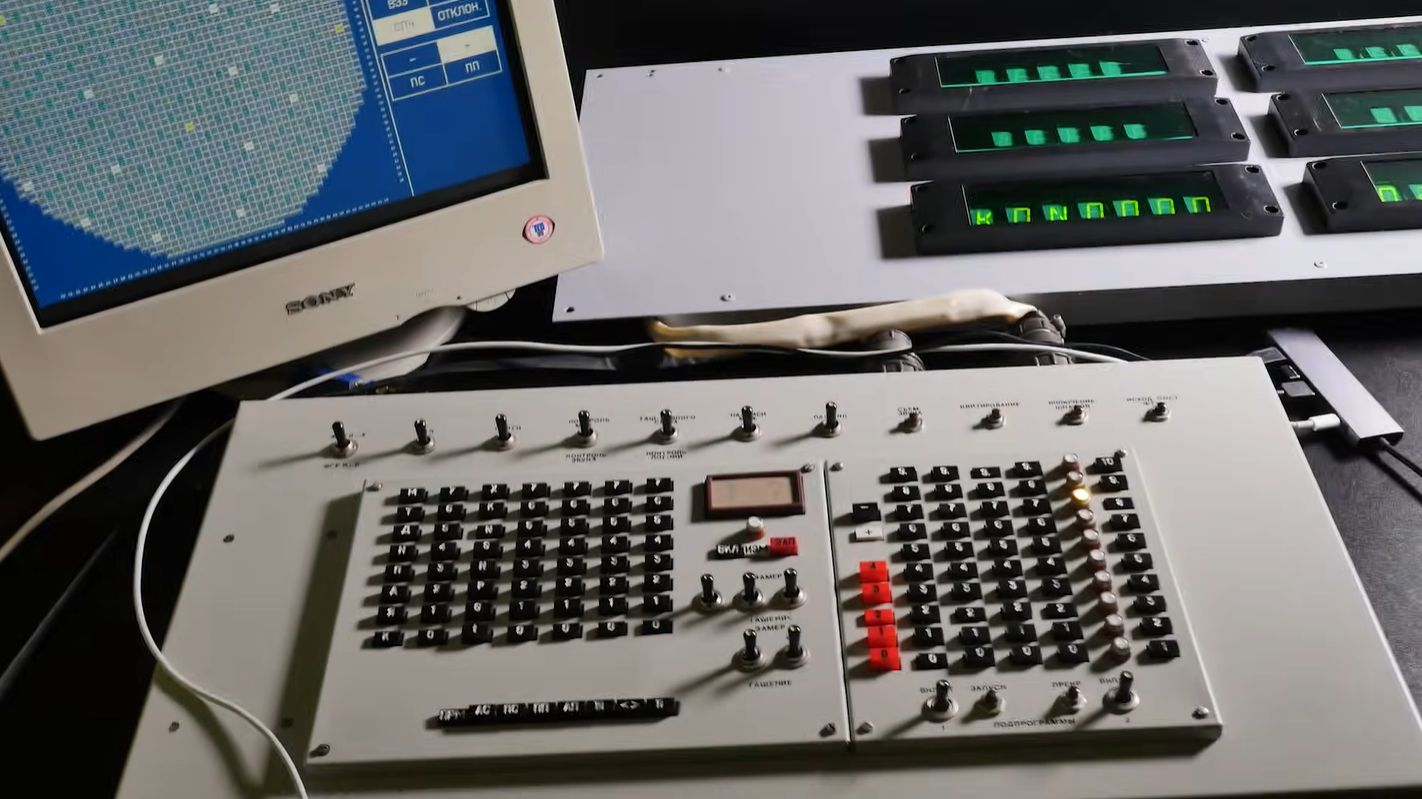
Using Your Own RBMK Reactor Control Center At Home https://hackaday.com/2026/07/13/using-your-own-rbmk-reactor-control-center-at-home/
#Computerhacks #Howto #Chernobyl #Industrialcontroller #Nuclearreactors #RBMK
Feed: All Latest | Use Tiny11 to Rescue a Computer Running Windows 10 by David Nield
AI generated summary, Read the full article for complete information.
Tiny11 is an unofficial, lightweight version of Windows 11 created for PCs that can’t meet Microsoft’s full‑system requirements or for users who want a less bloated experience after Windows 10 reaches end‑of‑life. Stripping out many pre‑installed apps such as Mail, Calendar, Edge, Media Player, and OneDrive, Tiny11 offers a leaner OS but lacks regular updates, official security patches, and Microsoft support, requiring a valid Windows 11 license key to run. Users can obtain a ready‑made Tiny11 ISO from the Internet Archive (ensuring the developer NTDEV is listed) or build their own by pairing the Tiny11 PowerShell script from GitHub with an official Windows 11 ISO, then creating a bootable USB drive with tools like Rufus. While it can extend the life of older hardware, alternatives such as Linux distributions or ChromeOS Flex are also viable for those seeking a free, supported platform.
Read more: https://www.wired.com/story/use-tiny11-to-rescue-a-computer-running-windows-10/
#Tiny11 #Windows10 #Windows11 #Microsoft #howto
Replying to
I wrote a quick #howto on how to install and configure #NevernesstoEverness on Linux.
Also tried to get it to run on #SteamDeck, but it keeps failing after pressing "Play" in the game launcher, will do some more reseach later as I see others have been able to run it.
High CPU usage in Windows 11 usually means a process is using more CPU cycles than it should. It could be due to excessive background apps, pending Windows updates, corrupted system files, or high-resource processes like antivirus scans and indexers.
Fixes for High CPU Usage (Windows 11)
Restart Your PC: This is the quickest way to clear stuck processes and memory.
Use Task Manager: Press Ctrl + Shift + Esc, find processes with high CPU usage, right-click them, and select "End task".
Disable Startup Apps: In Task Manager, go to the "Startup apps" tab, right-click unnecessary apps, and select "Disable".
Update Windows & Drivers: Go to Settings > Windows Update to ensure you have the latest performance patches.
Check Power Settings: Search for "Choose a power plan" in the Control Panel, and select "Balanced" or "High Performance".
Scan for Malware: Run a full scan with Windows Defender, as viruses can cause high CPU usage.
Disable SysMain (Superfetch): Search for "Services," find "SysMain," right-click to stop it, which can reduce background resource usage.
Disable High Precision Event Timer: In Device Manager, find "High precision event timer" under System Devices, right-click, and disable it
@followers #HighCPU #Windows11 #windows10 #technology #techtips #tech #howto #TechGuide #computer #pc #100cpu
"Syncthing is an open source tool that synchronises files continuously across multiple devices. It transfers data between two or more of your computers, without uploading any information to the cloud."
https://edafe.de/2026/02/install-syncthing-2-x-for-continuous-file-synchronisation-on-debian-or-ubuntu-or-raspberry-pi-os/
#android #cloud #debian #diday #digitalsovereignty #howto #ios #iphone #linux #linuxmint #macos #obsidianmd #opensource #privacy #raspberrypi #raspi #rpi #selfhosting #syncthing #synctrain #ubuntu #windows
Mounting a DVD player in Linux
Should be simple enough to remember, but brain says no. So here’s a reminder for me and if you need it, also for you. I need a DVD player mounted to /home/dvd so I can copy its contents of said DVD to /home/snorlax . It seems quite usual that a DVD is mounted to /dev/sr0 mkdir /home/dvd mount /dev/sr0 /home/dvd/ cd /home/dvd cp -vr * /home/snorlax Done. To unmount i
---
https://3xn.nl/projects/2026/03/09/mounting-a-dvd-player-in-linux/
---
#dvd #howto #linux #mount #umount
"Syncthing is an open source tool that synchronises files continuously across multiple devices. It transfers data between two or more of your computers, without uploading any information to the cloud."
Give Syncthing a try!
https://edafe.de/2026/02/install-syncthing-2-x-for-continuous-file-synchronisation-on-debian-or-ubuntu-or-raspberry-pi-os/
#android #bigtech #cloud #debian #did #diday #digitalindependenceday #digitalsovereignty #howto #ios #iphone #linux #linuxmint #macos #obsidianmd #opensource #privacy #raspberrypi #raspi #rpi #selfhosting #syncthing #ubuntu #unplugbigtech #windows
Replying to on flipboard.social
А рукодельцы-то не спят!
https://hackaday.com/2021/03/29/oh-brother-would-you-look-at-this-cistercian-clock/
#diy #howto
We wrote a little how-to on running FreeBSD 15.0 on a Raspberry Pi 5 with a Raspberry Pi M.2 HAT+ and a 256GB Integral M.2 NVMe SSD. https://locaverdi.com/freebsdrpi5.html #freebsd #rpi5 #howto #locaverdi
You've seen all posts